


Find what’s broken on any website. Win the client.
WebMedic is a browser extension that grades any site from A to F, explains every problem in plain English and turns it into a client report with your name on it.
Free plan with 10 credits a month. No card needed.
What you get
One extension. Audit, explain, pitch.
Every piece below is the real WebMedic interface, version 5.8.
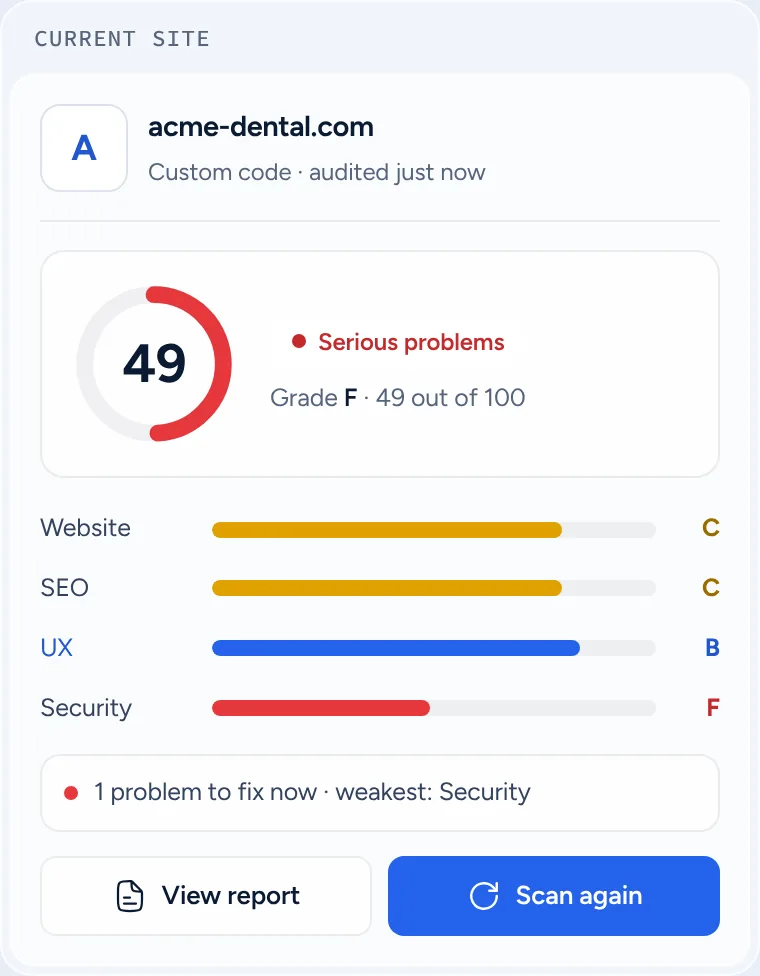
Website health
A grade for any site in seconds.
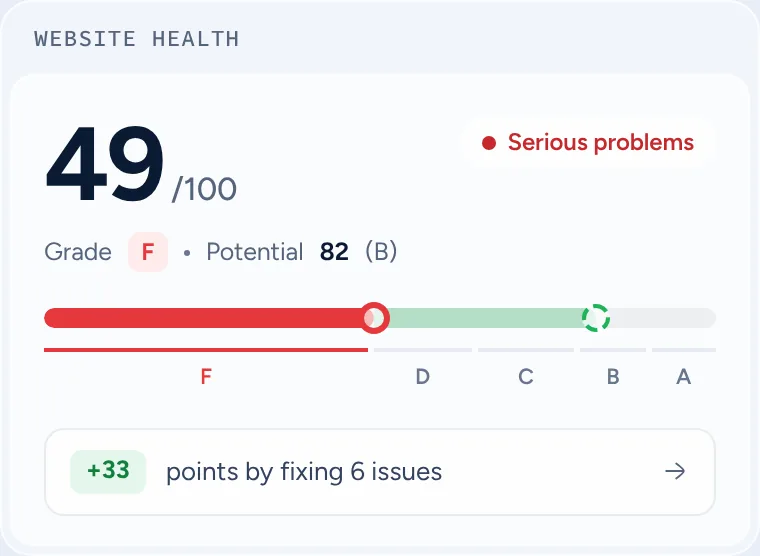
Open a website and click once. WebMedic scores it out of 100 and grades the five areas from A to F.
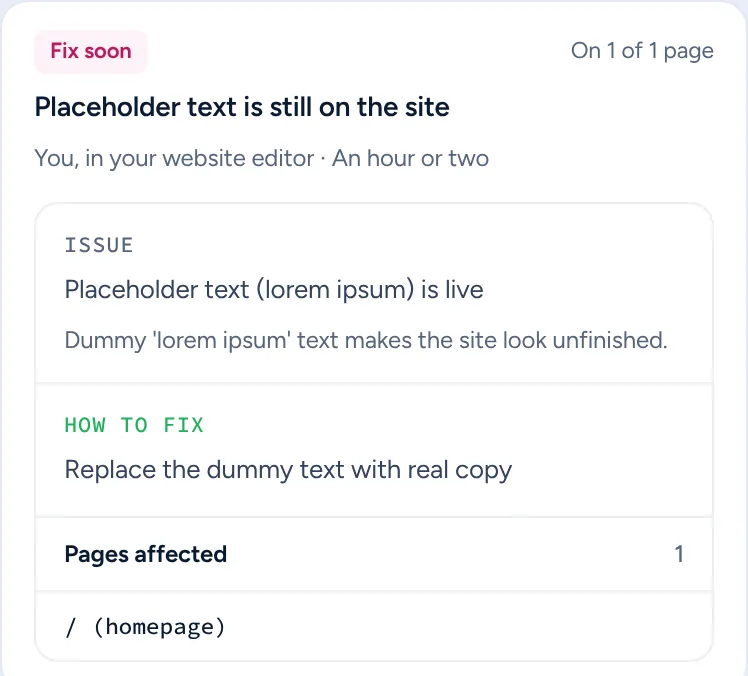
Plain-English fixes
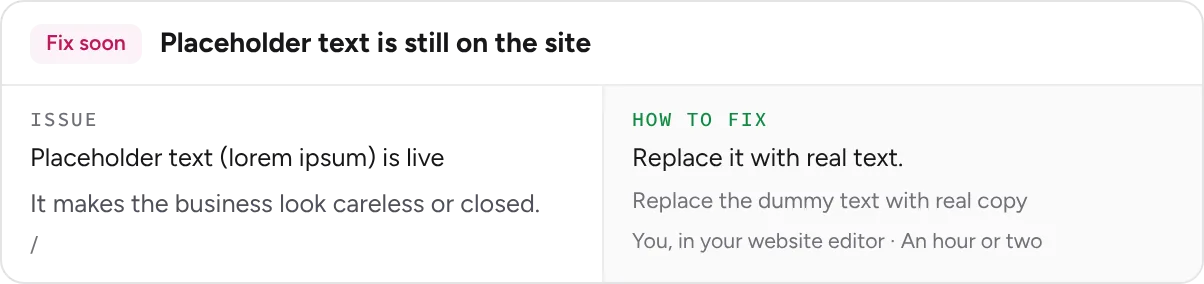
Every problem, explained.
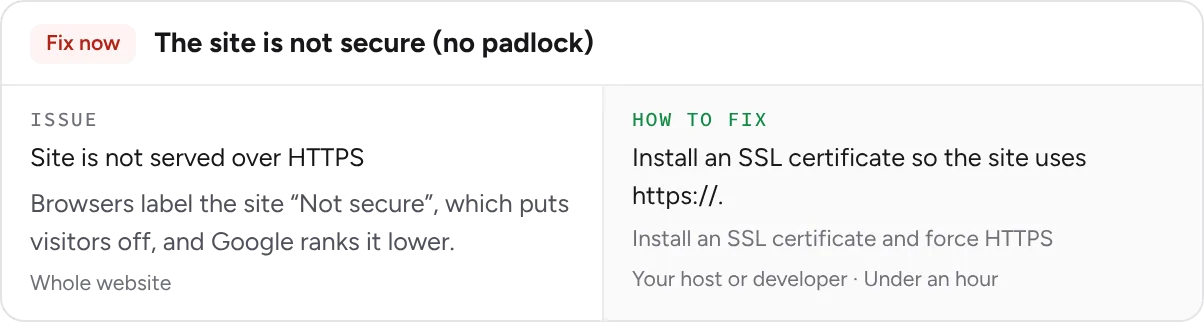
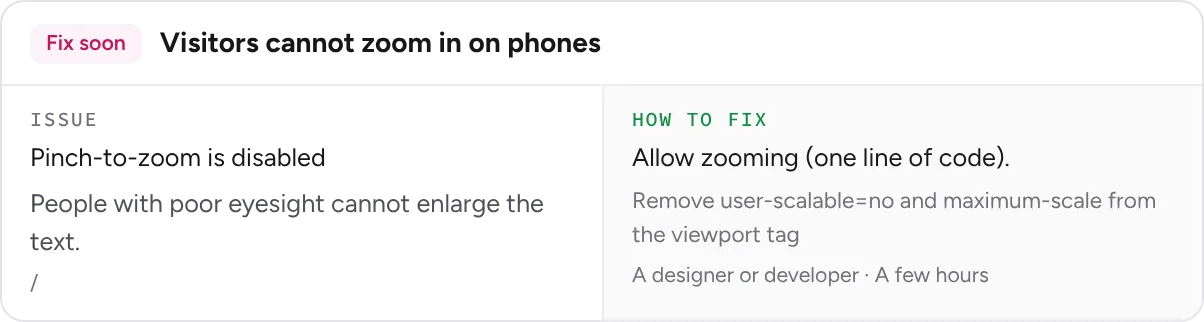
What the issue is, how to fix it, who should do it and how long it takes.

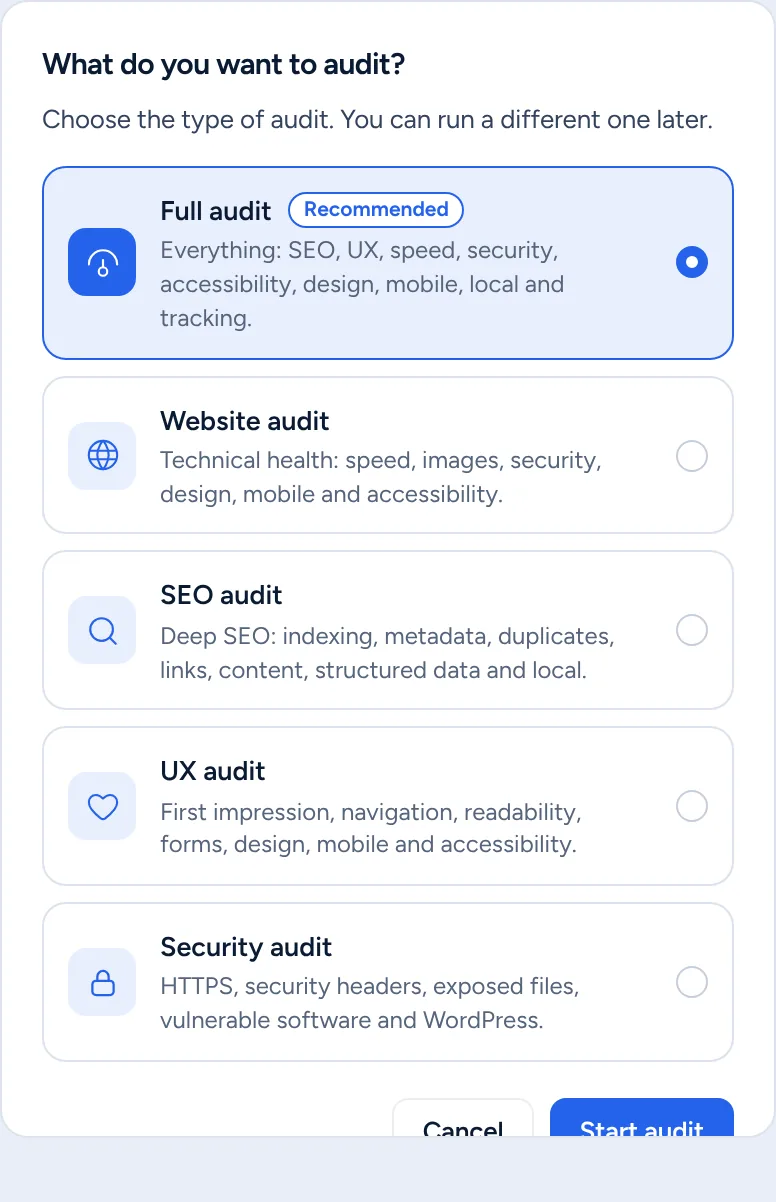
Five audit types
Audit everything, or one area.
Run a full audit, or just Website, SEO, UX or Security.
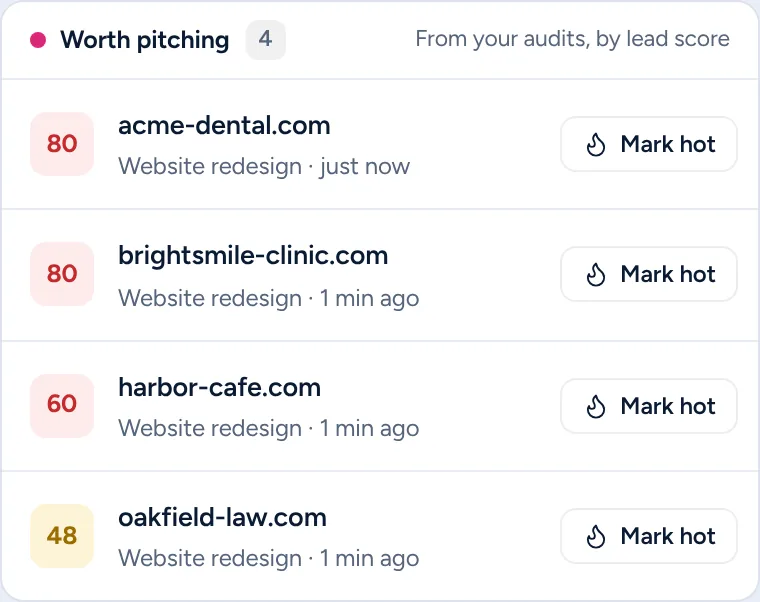
Lead scores
Know who to call first.
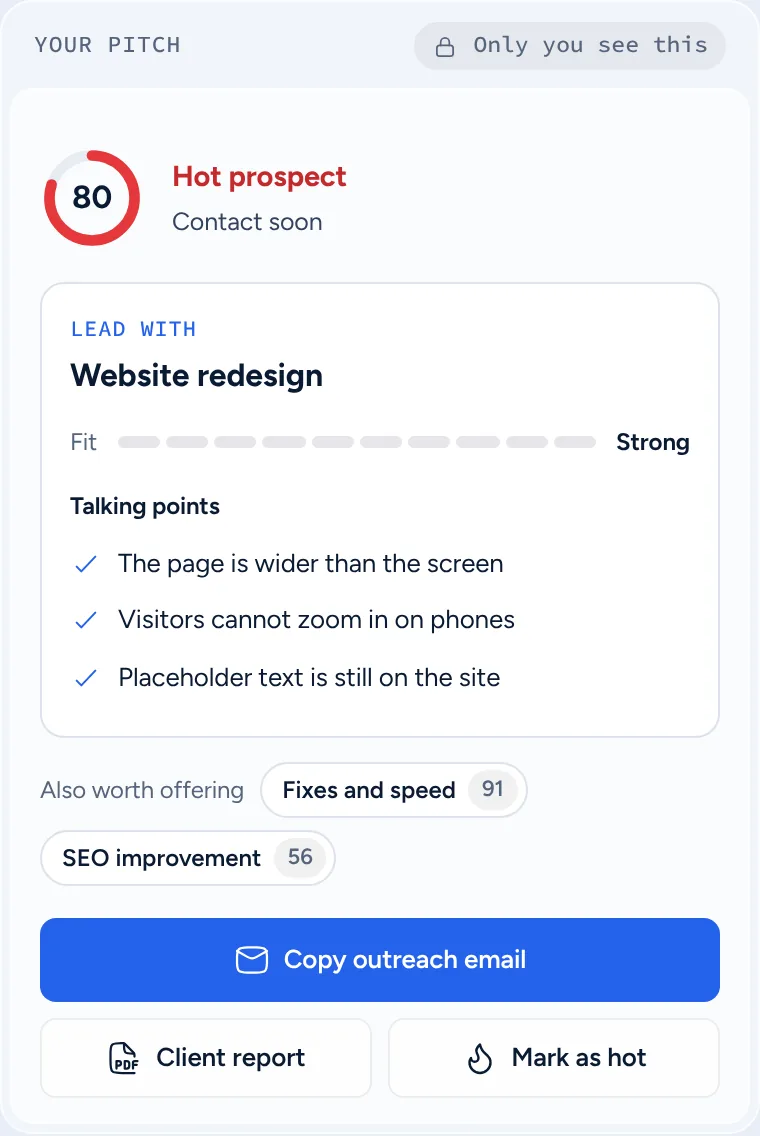
A lead score for every site, with the service most worth pitching.
Client report
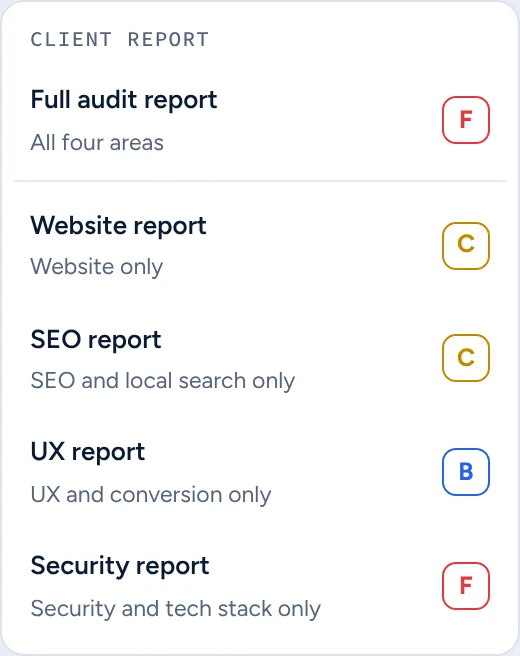
The full report, or one area.
Send all five areas, or a report for just one.
Lives in your browser
Opens on the site you are viewing.
Click the toolbar icon or press the shortcut. Dock it, float it or shrink it to a pill.
Works everywhere
Any platform, any site.
WebMedic detects what a site is built on and adapts its checks.
- WordPress
- Shopify
- Wix
- Squarespace
- Webflow
- Framer
- GoDaddy
- Duda
- BigCommerce
- HubSpot
- Ghost
- Joomla
- Drupal
- Magento
- PrestaShop
- TYPO3
WordPress gets extra checks: core version, plugins, open installer and exposed folders.
What it checks
Five areas. Six ways to audit.
Run a full audit of all five areas, or an audit of just one. Pick one to see what WebMedic looks at.
Want the whole picture in one go?
Full audit
Best forA first look at a new prospect
Is the site fast, well designed and working on phones?
Website audit
Tap a check to see what it finds.
Speed
Server speedHow fast the server answers
What it finds
- Pages are slow to respond
- Pages are not compressed
- Server uses the old HTTP/1.1 protocol
Page weightHeavy code that slows pages
What it finds
- Code delays the page from appearing
- Lots of outside services load on each page
- Fonts load slowly
ImagesSize, format and lazy loading
What it finds
- Some images are very large files
- Images use older, heavier file types
- Phones download desktop-size images
Look and feel
DesignConsistent fonts, buttons and colours
What it finds
- Buttons and fonts change from page to page
- Stretched or squashed images
- The site icon does not load
MobileLayout, zoom and tap targets
What it finds
- The site is not set up for phones
- Visitors cannot zoom in on phones
- Phones show a shrunk desktop layout
AccessibilityLabels, alt text and keyboard
What it finds
- Form fields have no labels
- Pictures have no descriptions
- Some buttons have no name
Safety
SecurityHTTPS, headers and exposed files
What it finds
- Site is not served over HTTPS
- Some page elements load insecurely
- No HSTS security header
WordPressCore, plugins and themes
What it finds
- WordPress core is out of date
- Plugins that are no longer maintained
- Theme updates are waiting
Sell it asA redesign, speed work or a mobile fix
Can people find the business on Google?
SEO audit
Tap a check to see what it finds.
On the page
TitlesPage titles and descriptions
What it finds
- Pages are missing a Google headline
- Google headlines are too short or too long
- Pages are missing a Google summary
KeywordsIn titles, headings and text
What it finds
- Main search phrase not in the homepage headline
- Main search phrase not in the main heading
- Headlines repeat the same word
ContentHeadings, word count, filler text
What it finds
- Pages have very little text
- Pages have no main heading
- Placeholder text is still on the site
Getting found
IndexingSitemap, noindex and canonicals
What it finds
- No XML sitemap found
- Some pages are hidden from Google
- Google is not told which page is the main one
DuplicatesRepeated titles and pages
What it finds
- Several pages share the same headline
- Several pages share the same summary
- Several pages say almost the same thing
LinksBroken links and redirects
What it finds
- Some links on the site are broken
- Some links go through redirects
- Pages do not link to each other much
Rich and local results
Structured dataSchema markup and its fields
What it finds
- Google is missing the business details
- Business details for Google are broken
- Business details for Google are incomplete
Local SEOAddress, phone, reviews and maps
What it finds
- No business address on the homepage
- No Google Map or directions link
- No link to Google reviews
Sell it asSEO, local SEO or content work
Do visitors find what they need and get in touch?
UX audit
Tap a check to see what it finds.
First visit
First impressionIs it clear what they do?
What it finds
- No call to action without scrolling
- A pop-up covers the page when it opens
- Videos play sound automatically
NavigationEasy to find things
What it finds
- Inner pages have no breadcrumb trail
- Some pages have too many links
- The "page not found" page is a dead end
ReadabilityText that is easy to read
What it finds
- Long pages have no sub-headings
- Some headings are very long
- Lines of text are too long to read
Getting in touch
Calls to actionA clear next step
What it finds
- Pages have no clear way to contact you
- Phone numbers cannot be tapped to call
- No reviews or testimonials on the homepage
FormsClear, labelled contact forms
What it finds
- Form fields have no labels
- The form shows an "I'm not a robot" box
- A sample email address is shown
Works for everyone
DesignA consistent look on every page
What it finds
- Buttons and fonts change from page to page
- Stretched or squashed images
- Empty spaces used for layout
MobileWorks well on phones
What it finds
- Visitors cannot zoom in on phones
- Phones show a shrunk desktop layout
- No icon for phone home screens
AccessibilityUsable by everyone
What it finds
- Some links have no text
- Keyboard navigation jumps around
- Headings are out of order
Sell it asConversion work: forms, calls to action, accessibility
Is the site safe, and is its software kept up to date?
Security audit
Tap a check to see what it finds.
The basics
HTTPSPadlock and HTTPS redirect
What it finds
- Site is not served over HTTPS
- http:// does not redirect to https://
- Some page elements load insecurely
Security headersHSTS, CSP and clickjacking
What it finds
- No HSTS security header
- No Content-Security-Policy header
- No clickjacking protection
Open doors
Exposed filesOpen folders and installers
What it finds
- WordPress installer is open
- Uploads folder can be browsed
- Plugins folder can be browsed
Login protectionPublic usernames, open login
What it finds
- Usernames are public
- Default login page is open to bots
- A public "admin" username
Error leaksErrors that show file paths
What it finds
- PHP errors are shown on the page
- A database error is showing
- Version numbers are shown publicly
Up to date and clean
Outdated softwareOld WordPress, PHP and plugins
What it finds
- WordPress core is out of date
- PHP version no longer gets fixes
- Plugins that are no longer maintained
Hack signsHidden links and odd scripts
What it finds
- Hidden links, a classic hack sign
- Encoded scripts that may hide malware
- Code nobody remembers adding
Email protectionSPF and DMARC records
What it finds
- No SPF email record
- No DMARC email protection
- DMARC set to monitor only
Sell it asA care plan or a maintenance retainer
Can the owner see what brings in customers?
Tracking audit
Tap a check to see what it finds.
Measuring
Analytics
What it finds
- No analytics or tracking found
- Google Analytics sends no data
- Old Universal Analytics tag still in place
Tag Manager
What it finds
- Tags are hard-coded instead of in Google Tag Manager
Ads and leads
Ad pixels
What it finds
- No Google Ads, Meta, TikTok or LinkedIn pixel
Conversions
What it finds
- Calls, forms and bookings are not tracked as conversions
Privacy
Consent
What it finds
- Ad or session-recording tags run with no cookie consent tool
Privacy policy
What it finds
- No privacy policy link on the homepage
Sell it asAnalytics set-up, ad tracking or a consent fix
How the numbers work
Every score is explained, not guessed.
Grades
A score out of 100, turned into a letter
Every grade sits on the same fixed scale, so a C always means the same thing.
Speed
Measured on the page as it loads
Accessibility
Cost figures
Clearly marked estimates
Based on the problems found and how visitors usually behave. Always shown as approximate, never as a promise.
The client report
A report owners actually read.
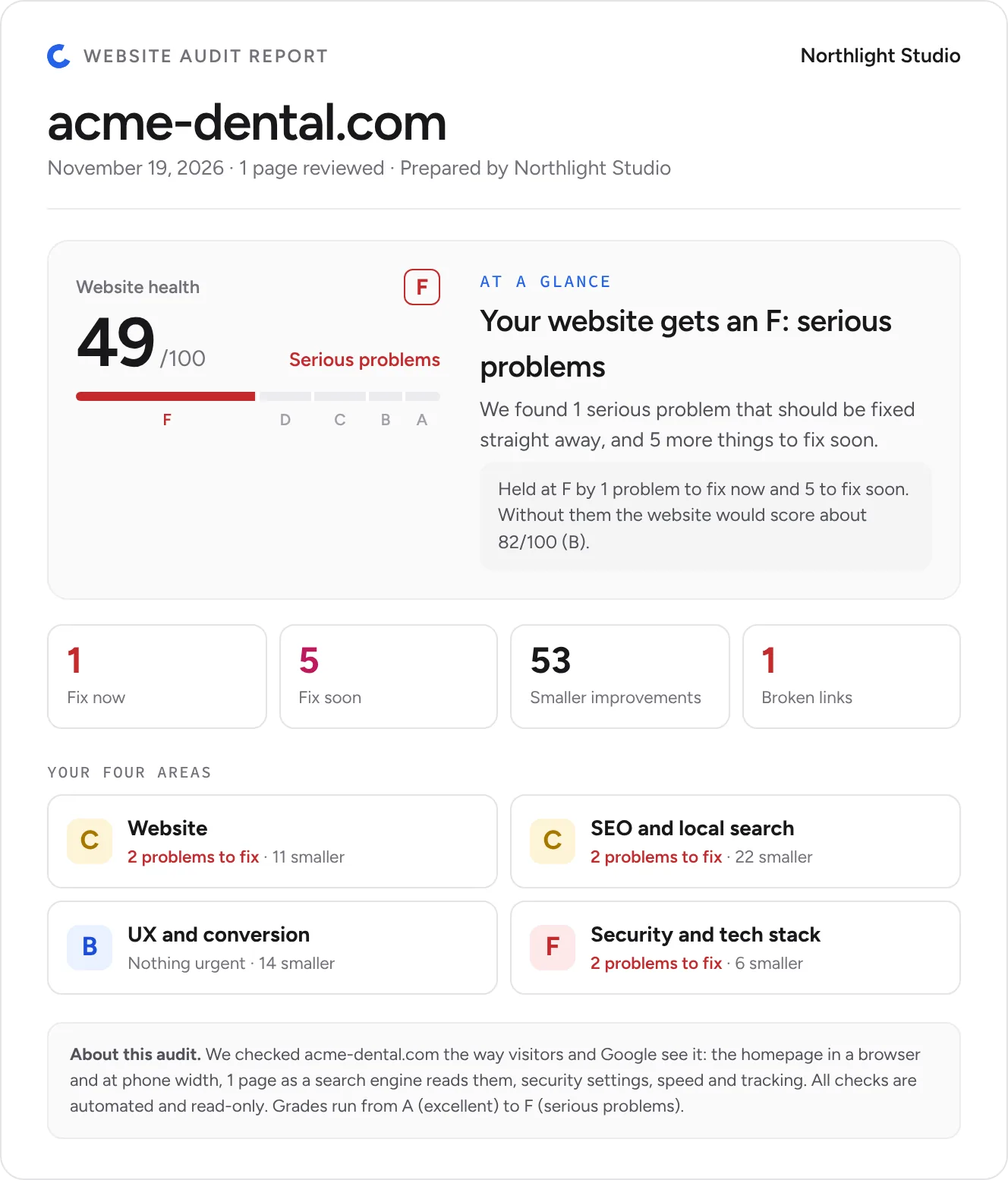
Turn any audit into a client-ready report in one click. Plain English, clear priorities and your studio’s name on every page.
- A to F grade up frontThe owner sees the score, the grade and all five areas before reading a word.
- Business impact, not jargonEach problem says what it costs them and the recommended fix.
- Full report or one areaSend everything, or just the Website, SEO, UX or Security report.
- Your brand, not oursPrepared by your studio. Download as PDF or present it live.
How it works
From a URL to proof in three steps.
- Step 1
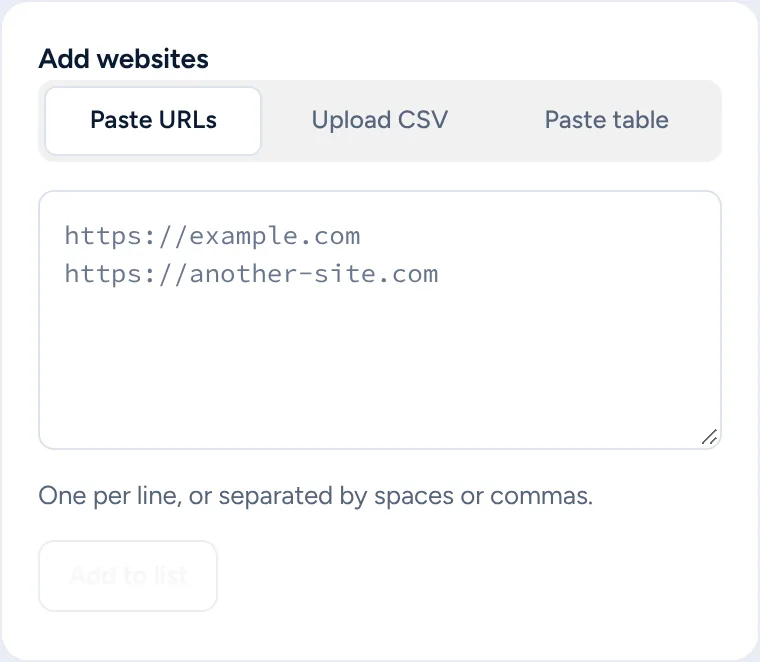
Add websites
Audit the page you are on in one tap, or paste URLs, upload a CSV or paste a table from Sheets.
- Step 2
Get a report card
Every site gets a score out of 100, an A to F grade for each of the five areas and a plain-English fix for every problem.
- Step 3
Pitch the work
A lead score shows who to call first, with talking points and a ready outreach email. Send the report with your name on it.

Pricing
Start free. Upgrade when you need more.

WebMedic
LiveCredit-based plans. Cancel anytime.
Free
For trying WebMedic on a few prospects.
Free forever
Start freeNo card needed · Set up in a minute
- 10 credits a month
- Quick audits, up to 5 pages
- Every check, lead score and pitch
- PDF reports with our branding
- Bulk audits from a list or CSVNot included
- CSV export and Hot LeadsNot included
- AI-written outreach emailsNot included
- Team seats and priority supportNot included
Starter
For solo experts doing outreach every week.
Launch price until 31 January 2027, then $19
Join the waitlistPaid plans open soon · No payment now
- 100 credits a month
- Quick and deep audits, up to 50 pages
- Every check, lead score and pitch
- White-label PDF reports
- Bulk audits from a list or CSV
- CSV export and Hot Leads
- AI-written outreach emailsNot included
- Team seats and priority supportNot included
Agency
For teams auditing prospects at volume.
Billed monthly
Join the waitlistPaid plans open soon · No payment now
- 400 credits a month
- Quick and deep audits, up to 50 pages
- Every check, lead score and pitch
- White-label PDF reports
- Bulk audits from a list or CSV
- CSV export and Hot Leads
- AI-written outreach emails Coming soon
- 3 team seats and priority support
- Any audit1 credit
- Bulk1 credit per site
- Creditsreset every month
- Top-upscoming soon
Paid plans open soon.
Free is live today. Starter and Agency open soon. Join the waitlist and we will email you when they open, with the launch price held for you: Starter at $9.99 a month.
Secure checkoutCreem is our Merchant of Record and handles payment, tax and invoices.
14-day money-backNot right for you? Ask within 14 days of your first purchase for a full refund.
Cancel anytimeFrom your account. You keep access until the period ends.
Real people answersupport@
Prices in USD. Taxes may apply at checkout. See our Refund Policy and Terms of Service.
FAQ
WebMedic, answered.
1What does WebMedic check?
Five areas: Website (speed, images, design and mobile), SEO and local search, UX and conversion, Security and tech stack, and Tracking (analytics, ad pixels and consent). Run a full audit of all five, or an audit of just one. It reads up to 50 pages and tests the homepage the way visitors see it.
2Which website platforms does it work on?
All of them. It detects WordPress, Shopify, Wix, Squarespace, Webflow, Framer and more, plus custom-coded sites, and runs extra checks for the platform it finds.
3How are the cost figures worked out?
They’re estimates based on the issues found and how visitors usually behave on sites like theirs. That’s why they’re shown as approximate numbers.
4Will my prospect see the OrbitProspect name?
Not on Starter or Agency. Reports carry your logo and name. Reports on the Free plan include a small “Made with WebMedic” line.
5How do credits work?
Every audit costs 1 credit, whether it is a quick audit or a deep one. Free includes quick audits of up to 5 pages, and Starter and Agency add deep audits of up to 50 pages. Free gives you 10 credits a month, Starter 100 and Agency 400. Bulk audits cost 1 credit per site. Credits reset at the end of each month on every plan, and unused credits do not carry over.
6When can I buy a paid plan?
The Free plan is live now. Starter and Agency open soon. Join the waitlist and we will email you when they open, with the launch price held for you.
7Who handles my payment?
Creem, our Merchant of Record. Creem processes the payment, adds the right tax and sends your invoice. Your first purchase has a 14-day money-back guarantee.
8Which browsers does it work in?
Microsoft Edge today. Install WebMedic from the Microsoft Edge Add-ons store, open any website and click the icon to start. A Chrome Web Store version is coming soon.
Your next client is one audit away.
Add WebMedic to Edge and run your first audit free.